

Introduction: Why Creating Slides Still Feels Hard
Presentations are a routine part of professional work, yet they continue to feel harder than they should.
The challenge is rarely a lack of ideas. Most people know what they want to say. The difficulty starts when those ideas need to be turned into slides that are clear, structured, and visually consistent. That translation from thinking to presentation is where time is lost.
Traditional slide tools expect users to begin with design decisions. Layouts, spacing, hierarchy, and alignment become early concerns, even before the message is clear. For non-designers, this creates friction. For experienced professionals, it becomes an unnecessary distraction.
This is why AI presentation makers exist. Their role is not just to make slides faster, but to reduce the gap between raw thinking and polished output. However, not all tools approach this problem in the same way. Some focus on speed alone. Others prioritize structure and iteration.
This article explains how Alai approaches presentation creation differently. Instead of starting with design or templates, it starts with ideas and builds structure around them. The focus is on workflow, not shortcuts.
The Blank-Slide Problem (And Why It Matters)
The blank slide is one of the most underestimated obstacles in presentation creation.
When someone opens a presentation tool and sees an empty slide, several questions appear immediately. How many slides should this be? What should come first? Should this be text-heavy or visual? Even experienced professionals pause at this stage.
This hesitation is not about creativity. It is about structure. People think in ideas, not in slides. A blank canvas forces them to translate thoughts into layouts before the message is fully formed.
Templates attempt to solve this by providing predefined structures. While helpful in simple cases, templates introduce a different problem. They assume the content will behave in a certain way. As soon as ideas evolve or do not fit neatly, users start fighting the template instead of refining the message.
Over time, this leads to two common outcomes. Either the presentation becomes cluttered as content is forced into rigid layouts, or quality drops as users rush to fill slides without clarity.
The blank-slide problem matters because it sets the tone for everything that follows. When structure is weak at the start, no amount of design polish fixes the confusion later.
AI presentation makers that address this problem properly focus on helping users begin with ideas, not layouts. They reduce early friction so that structure emerges naturally instead of being forced.
Starting With Raw Ideas Instead of Finished Slides
Most presentations do not begin as slides.
They begin as notes in a document, bullet points in a chat, or rough ideas written down quickly before a meeting. At that stage, thinking is still fluid. Ideas are incomplete. The structure is not final. That is normal.
The problem starts when presentation tools force users to convert these early thoughts into slides too soon. Instead of refining ideas, people start worrying about layouts, spacing, and slide count. The tool pulls attention away from thinking and toward formatting.
This is where many presentations lose clarity before they even take shape.
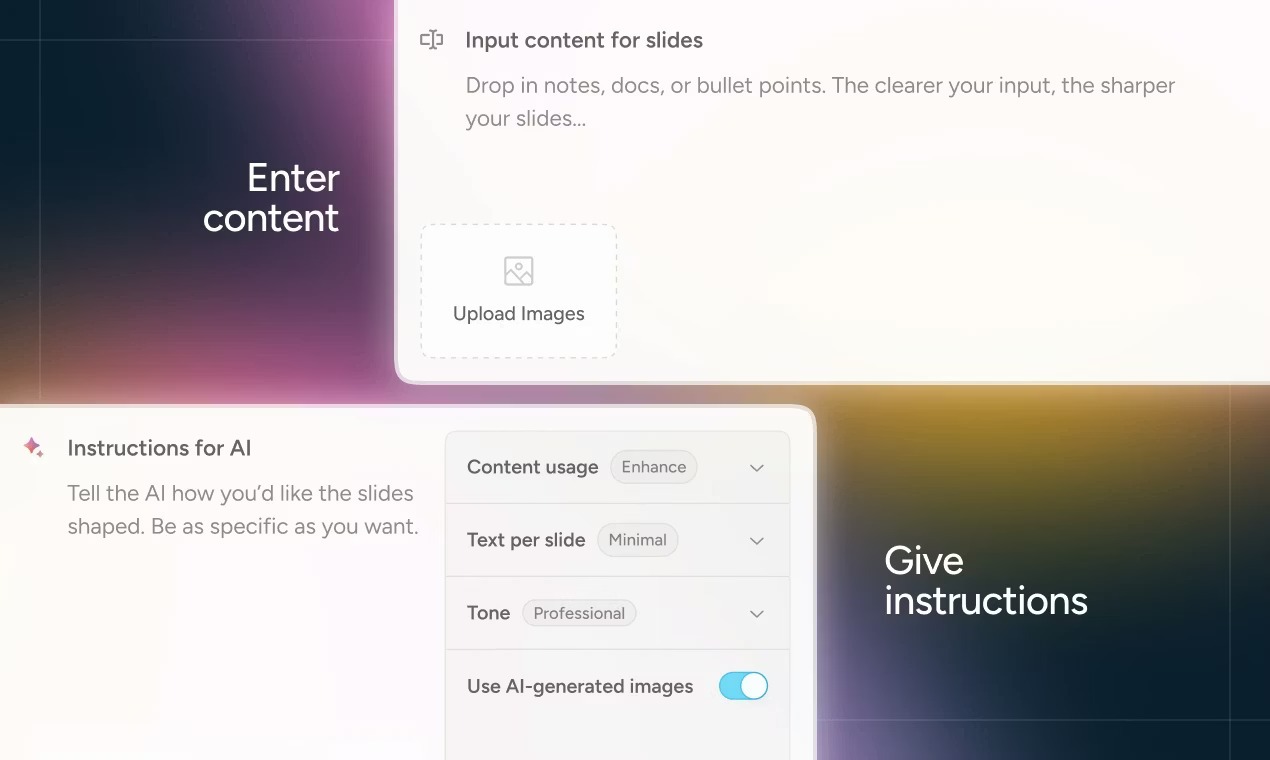
A more effective approach is to let people start where they already are. With raw text. With outlines. With unfinished ideas. The role of an AI presentation maker at this stage is not to decorate content, but to help organize it.
This is the mindset behind how Alai approaches presentation creation.
Why Thinking in Slides Slows People Down
Slides are a delivery format, not a thinking format.
When people are asked to think in slides too early, they simplify ideas prematurely. Complex thoughts get broken into shallow bullet points. Important context is removed to make content “fit” a layout.
This leads to presentations that look clean but feel thin.
Starting with raw ideas allows structure to emerge naturally. It keeps thinking intact before decisions about emphasis and flow are made. This is especially important for professionals working on pitch decks, strategy presentations, or educational material, where clarity matters more than speed.
AI presentation makers that respect this process reduce friction at the most critical moment: the beginning.
Turning Rough Content Into Structured Slides
When raw content is used as a starting point, the next challenge is structure.
A list of ideas does not automatically translate into a clear presentation. Some points belong together. Others deserve their own space. Some ideas need visual emphasis, while others need explanation.
Alai helps bridge this gap by interpreting raw text and suggesting slide structures instead of forcing users to design them manually. The focus is on grouping ideas logically and establishing flow across the deck.
Instead of asking users to decide:
- how many slides to create
- what layout to use
- where emphasis should go
The system proposes a structure that can be reviewed and refined.
This shifts effort away from formatting and back toward judgment. Users are not locked into the first result. They can adjust structure without rebuilding slides from scratch.
Why Alai Produces High-Quality Slides
Speed alone does not define a good presentation. What matters more is how clearly ideas are structured and how comfortably they can be understood by the audience.
Alai focuses on presentation quality by building layouts around the content itself. Instead of placing text into fixed templates, the system adjusts spacing, alignment, and layout structure based on what the slide is trying to communicate. This allows each slide to feel balanced and intentional, rather than crowded or forced.
Because layouts adapt to the content, visual hierarchy remains clear even as slides evolve. Headings, supporting points, and visuals naturally find their place without requiring manual adjustment. This is especially helpful for non-designers who want professional results without making layout decisions themselves.
Alai also includes presentation-specific visual elements such as comparisons, feature matrices, funnels, and structured diagrams. These elements are designed specifically for explaining ideas in a presentation format, not for decorative design purposes.
Another factor that supports quality is choice. For every idea, Alai generates four different slide options. This allows users to compare structures and select the version that best fits their message, instead of committing to a single layout too early.
Together, adaptive layouts, presentation-focused elements, and multiple design options help ensure that slides remain clear, consistent, and professional throughout the process.
Working With Existing Content Instead of Starting Over
In real workflows, presentations are rarely created from nothing.
Most people already have content in some form. It might be a document, a set of notes, or an older deck that needs updating. Starting over wastes time and increases the risk of losing important context.
An effective AI presentation maker should adapt to existing material rather than forcing users to rewrite everything.
By allowing users to bring in content as it already exists, Alai supports continuity. Ideas are preserved. Structure is improved gradually. The presentation evolves instead of being rebuilt.
This is especially valuable for teams that revise presentations often. Strategy decks, sales materials, and training content tend to change over time. A workflow that respects existing content makes those revisions easier and more consistent.
Why This Approach Helps Non-Designers and Professionals Alike
Starting with raw ideas benefits different users in different ways.
For non-designers, it removes pressure. They are not expected to make visual decisions they are uncomfortable with. The tool provides structure while leaving room for judgment.
For experienced professionals, it speeds up iteration. They can focus on refining arguments and flow instead of adjusting layouts. Changes feel safer because structure adapts automatically.
In both cases, the presentation improves because thinking stays intact longer. Design decisions are made when they matter, not when they distract.
This is the foundation for turning raw content into polished slides without forcing people to become designers first.

Generating Multiple Slide Layouts Per Idea
One of the biggest mistakes people make when creating presentations is committing to structure too early.
The first layout is rarely the best one. It is simply the first interpretation of an idea. Once a layout is chosen, people tend to work around it instead of questioning whether it actually supports the message. Over time, this leads to presentations that feel constrained, even when the content is strong.
This is why generating a single slide per idea often creates more work later.
A better approach is to explore structure before committing to it.
Using Nano Banana Pro Slides for Visual Clarity
Some ideas are easier to understand visually than through text alone. This is especially true for concepts, systems, or relationships that involve multiple parts or layers of meaning.
Nano Banana Pro slides are designed to support this kind of communication. They allow users to create dense, meaningful visuals that can explain complex ideas within a single slide while remaining readable and structured.
These slides are built specifically for presentations. They are theme-aware, editable, and integrated into the overall deck, which means they do not break visual consistency. Users can refine them using presets or annotations, just like other slide elements.
Nano Banana Pro slides are particularly useful when explaining abstract concepts, workflows, or comparisons where text would feel overwhelming. By combining visual expression with layout control, they help convey more meaning without increasing slide clutter.
This capability adds another layer of quality to presentations by allowing ideas to be visualized clearly without sacrificing structure or editability.
Why One Layout Is Never Enough
Ideas can be expressed in more than one way.
The same concept might work as a comparison, a progression, or a single focused statement depending on context. Choosing the wrong structure early can distort emphasis and weaken clarity.
Traditional slide tools force an early decision. Users pick a layout, place content inside it, and then adjust endlessly when it does not fit. The layout becomes the constraint instead of the message.
By contrast, Alai generates 4 options per slide, generating multiple slide layouts per idea allows users to evaluate structure first. They can see how different arrangements affect meaning and flow before deciding which one belongs in the deck.
This shifts effort away from fixing slides and toward choosing the right narrative.
Exploring Structure Without Rework
When multiple slide options are generated from the same idea, something important happens. Users stop thinking in terms of “designing slides” and start thinking in terms of “shaping ideas.”
Alai uses this approach to reduce rework later in the process. Instead of locking users into a single layout, it presents alternative ways the idea could live on a slide.
Some options emphasize hierarchy. Others highlight contrast or flow. Users can quickly see which structure supports their intent without rebuilding content manually.
This exploration phase is where many clarity decisions should be made. Once the right structure is chosen, refinement becomes much easier.
How This Improves Flow Across the Deck
Presentations are not collections of isolated slides. They are sequences of ideas.
When structure decisions are rushed, flow suffers. Slides may make sense individually but feel disjointed together. Transitions become awkward. Important points feel buried.
Generating multiple layouts per idea helps prevent this. Users can choose structures that complement surrounding slides instead of fighting them. The deck develops a rhythm instead of feeling patched together.
This is especially important in longer presentations, where small structural mistakes compound quickly.
Choosing Before Committing Saves Time Later
At first glance, generating multiple layouts may seem slower. In practice, it saves time.
Most rework in presentations happens because structure was wrong, not because visuals were imperfect. Fixing structure after slides are built is expensive. Fixing it early is cheap.
By allowing users to compare and select layouts before committing, AI presentation makers reduce the need for downstream fixes. Edits become refinements instead of repairs.
This is one of the key reasons presentations created this way tend to feel clearer and more intentional, even before design polish is applied.
How the Responsive Canvas Adapts Automatically
Once structure is in place, the next challenge is editing.
This is where many presentations start to break down. Text changes slightly. A point is added or removed. Suddenly spacing feels off, alignment breaks, and slides need manual fixing. Over time, small layout issues accumulate and quality slowly degrades.
This problem exists because most slide tools treat layouts as fragile. They assume content will stay the same length and shape. Real presentations rarely behave that way.
A responsive canvas is designed to handle change without falling apart.
Why Manual Layout Fixes Waste Time
In traditional presentation tools, even small edits can cause unexpected problems.
Adding a sentence may push text out of bounds. Removing a line may leave awkward gaps. Moving one element often requires adjusting several others. These fixes are rarely difficult, but they are repetitive and distracting.
The cost is not just time. It is attention.
Every minute spent fixing spacing is a minute not spent improving the message. Over long presentations or frequent revisions, this adds up quickly.
For teams that update decks regularly, manual layout work becomes a constant drain.
What a Responsive Canvas Actually Means
A responsive canvas adapts layouts automatically as content changes.
When text is edited, elements reposition themselves to maintain balance. When content grows or shrinks, spacing adjusts without breaking hierarchy. The slide responds to the idea, not the other way around.
This does not mean giving up control. It means removing unnecessary decisions.
Users still decide what belongs on a slide and how ideas should be emphasized. The system handles alignment, spacing, and proportion in the background.
This allows editing to feel safe. Changes do not create new problems. Slides remain readable and consistent as they evolve.
Why This Matters During Real Revisions
Most presentations are revised multiple times.
Feedback arrives. Sections are reordered. Messages are refined. Slides that looked fine in the first draft are adjusted to match new priorities. This is normal professional behavior.
Without a responsive canvas, each revision increases the risk of layout degradation. Over time, the presentation feels less intentional, even if the content improves.
With a responsive canvas, structure is protected. Edits improve clarity without introducing visual noise. The presentation remains stable even as ideas evolve.
This stability is especially important in longer decks, where small inconsistencies become more noticeable.
Keeping Consistency Without Locking Layouts
One common concern with adaptive layouts is loss of consistency.
In practice, the opposite is true. When layouts respond automatically within a shared system, consistency is easier to maintain. Fonts, spacing rules, and visual hierarchy remain aligned across slides.
Instead of locking users into rigid templates, the system enforces consistency quietly. Users do not have to remember rules or fix mistakes. The presentation holds together on its own.
This balance between flexibility and structure is what allows presentations to improve over time instead of drifting.
How This Supports Professional Workflows
For professionals, presentations are rarely one-off tasks.
They are reused, updated, and adapted for different audiences. A responsive canvas supports this reality. It allows slides to change without requiring constant cleanup.
This makes AI presentation makers more than generators. They become tools that support thinking and iteration, not just output.
Alai uses this approach so that users can focus on refining ideas while the system protects layout integrity in the background.
Editing Slides Manually or With AI (Without Breaking the Deck)
Editing is where presentations are either improved or quietly damaged.
In real workflows, slides are rarely finished after the first draft. Text is rewritten. Sections are reordered. Slides are split, merged, or removed. This is normal. What matters is how the tool handles these changes.
Many presentation tools struggle here. Manual editing gives control but requires constant layout fixes. Automated editing saves time but often removes nuance. The best workflows combine both.
Why Full Automation Feels Limiting
Fully automated slide generation looks impressive at first.
Text becomes slides instantly. Layouts appear balanced. But as soon as users want to adjust tone, emphasis, or flow, automation starts to feel restrictive. The system assumes the first output is correct.
When users cannot easily intervene, they work around the tool instead of with it. This leads to duplicated slides, messy edits, or abandoning automation altogether.
Automation works best when it supports decisions, not when it replaces them.
Why Manual Editing Alone Is Not Enough
On the other hand, fully manual editing brings its own problems.
Every change requires attention to spacing, alignment, and hierarchy. Small edits can introduce inconsistencies that are hard to notice immediately. Over time, these issues accumulate.
Manual control is valuable, but it should not require constant vigilance. Professionals need tools that reduce mechanical work while preserving judgment.
This is where combining manual control with AI support becomes useful.
How Context-Aware Editing Works in Practice
Context-aware editing means the system understands the presentation as a whole.
When a slide is edited, the system considers how that change affects surrounding slides. When content is rewritten, it maintains tone and structure across the deck. When slides are split or merged, layout consistency is preserved.
This matters because presentations are not collections of independent slides. They are narratives. Changes in one place affect meaning elsewhere.
By treating the deck as a unified system, AI-assisted edits improve clarity without fragmenting the presentation.
Using AI Where It Helps Most
AI is most useful when it reduces repetitive effort.
In editing workflows, this includes:
- rewriting text for clarity
- summarizing long sections
- adjusting tone for consistency
- splitting dense slides into clearer units
These tasks benefit from automation because they are mechanical rather than strategic. The user still decides what the message should be. The system helps execute the change cleanly.
The key is that AI actions remain reversible and editable. Users stay in control.
Keeping Control While Speeding Up Revisions
The most effective editing workflows feel balanced.
Users can make manual changes when nuance matters. AI assists when speed and consistency are more important. Layout remains stable throughout.
Alai is designed around this balance. Editing does not feel like switching between modes. It feels like refining the same presentation with different tools.
This makes revision less stressful and more productive. Instead of worrying about breaking slides, users focus on improving the message.
Importing Existing Documents Instead of Starting From Scratch
In real work, presentations rarely begin as blank projects.
Most people already have content in some form. It may be a document, a proposal, a report, meeting notes, or an older slide deck that needs updating. Rewriting everything just to fit a new tool wastes time and increases the risk of losing important context.
This is why importing existing material is not a convenience feature. It is a requirement for professional workflows.
Why Starting Over Is a Problem
When people are forced to rebuild presentations from scratch, several things go wrong.
First, useful context is lost. Supporting details, careful phrasing, and logical flow often disappear during re-entry. Second, time is wasted on work that has already been done. Third, users rush through reconstruction, which reduces quality.
This leads to presentations that look new but feel thinner than the originals.
An effective AI presentation maker should adapt to existing content, not demand that users abandon it.
Working With Documents and Old Decks
Importing content is only useful if the system understands how to work with it.
Simply placing text onto slides does not solve the problem. The challenge is structure. Documents are linear. Presentations are visual and hierarchical. Moving from one format to the other requires interpretation.
Alai approaches this by treating imported content as raw material rather than fixed layouts. Text is analyzed for meaning and grouped logically. Slide structures are suggested instead of imposed.
This allows users to review and refine structure without losing the original intent of the content.
Restyling Without Forcing Templates
One of the hardest parts of updating old presentations is restyling them.
Templates often conflict with existing content. Text overflows. Visual hierarchy breaks. Slides need manual correction to fit a new look.
By using a responsive system rather than rigid templates, imported content can be restyled without being forced into predefined shapes. Structure adjusts. Spacing adapts. Visual consistency improves without extensive cleanup.
This makes it practical to modernize presentations instead of rebuilding them.
Why This Matters for Teams and Ongoing Work
For teams, presentations are rarely single-use assets.
Sales decks are customized repeatedly. Strategy presentations evolve quarter by quarter. Training materials are updated as organizations grow.
Importing existing content allows teams to treat presentations as living documents. Updates build on previous work instead of replacing it. Quality improves over time instead of resetting with each new version.
This approach saves time, preserves institutional knowledge, and supports consistency across presentations.
Exporting to PDF and PowerPoint Without Losing Quality
Even with modern tools, exporting still matters.
Presentations are shared with clients, reviewed by stakeholders, presented offline, or handed off to teams that use different software. No matter how good the editor is, the final output has to travel well.
This is where many presentation tools fall short. Slides may look clean inside the tool but lose spacing, hierarchy, or readability once exported. Fonts shift. Layouts break. What felt polished becomes fragile.
A strong AI presentation maker treats export as part of the workflow, not as an afterthought.
Why Export Is Still a Real Requirement
Despite cloud tools and live editors, PDF and PowerPoint remain standard formats.
PDFs are used for sharing and review. PowerPoint is still common in meetings, enterprise environments, and client handoffs. If a tool cannot export reliably to these formats, it creates friction at the final step.
Professionals need confidence that what they present is what others will see. Any mismatch undermines trust.
Preserving Structure and Readability After Export
Good exports do not just capture visuals. They preserve structure.
Spacing, hierarchy, and emphasis need to survive the transition from editor to file. Slides should remain readable without explanation. Visual balance should hold up when viewed on different screens.
Because Alai is built around a responsive system rather than fixed templates, layouts adapt cleanly during export. Slides do not rely on fragile positioning that breaks outside the editor.
This allows presentations to move between environments without losing quality.
Why This Completes the Workflow
When export works reliably, the entire workflow makes sense.
Ideas start as raw content. Structure is explored before commitment. Layouts adapt as content changes. Editing remains safe. Existing material is reused. And finally, output is shared without compromise.
This is what makes an AI presentation maker useful beyond demos. It supports the full lifecycle of a presentation, not just the moment of creation.
Who This Workflow Is Best For
This approach suits people who treat presentations as working documents.
Founders refining pitch decks across conversations. Sales teams adapting decks for different clients. Educators revising materials each term. Teams that update presentations regularly instead of recreating them.
For these users, quality is not about appearance alone. It is about durability.
Alai is designed for this reality. The focus is not on shortcuts, but on supporting thinking, structure, and revision over time.
Final Perspective: From Ideas to Polished Slides
Presentations improve when tools stop demanding design decisions too early.
Starting with raw ideas keeps thinking intact. Exploring structure before committing reduces rework. Responsive layouts protect quality during edits. Context-aware assistance speeds up refinement without removing control. Reliable export ensures the final result travels well.
AI presentation makers are most valuable when they remove friction quietly. When they support judgment instead of replacing it. When they help ideas become clearer without forcing people to become designers.
That is how raw content turns into polished slides that actually work.
Common Questions About AI Presentation Makers
What makes Alai a high-quality AI presentation maker?
Alai focuses on structure, spacing, and presentation-specific layouts rather than forcing content into rigid templates. Its adaptive layouts, multiple slide options per idea, and support for structured visuals help maintain clarity and consistency as presentations evolve.
Do I need design skills to use an AI presentation maker?
No. The purpose of an AI presentation maker is to handle layout and structure so users can focus on ideas and messaging.
Can I still edit slides after they are generated?
Yes. Strong tools are designed for revision. Editing should improve slides without breaking layout or consistency.
Is this workflow suitable for long presentations?
Yes. It is especially useful for longer decks where small layout issues can accumulate over time.
Can existing documents be reused instead of starting over?
Yes. Adapting existing content preserves context and saves time, which is critical in real workflows.
Why does context-aware editing matter?
Because presentations are narratives. Changes in one slide affect others. Context-aware editing keeps the deck coherent as it evolves.
